
Communications · Multichannel

Reach your customers where they prefer: email, SMS, push, WhatsApp and RCS from one tool

The module Comunica runs the loyalty program's multichannel communication campaigns. Five channels — email, SMS, push notification, WhatsApp e RCS — with reusable templates and dynamic tags that fill in automatically with the customer's data: name, points balance, tier and more.

Campaigns reach Audience segments, or the entire customer base. The promo engine can send messages automatically as a workflow action, with no manual step.

Templates · Dynamic tags

Reusable templates with dynamic tags: every message speaks directly to that customer

I dynamic tags are replaced automatically with the customer's real data at send time: #Nome#, #SaldoPunti#, #Tier#, #Email# and others. You create a template once and reuse it for every campaign, or as a system preset.

I ready-made presets — coupon gift, Gift Card gift, standard notifications — are ready for the most common cases. The back office includes a real-time preview of the message with the values filled in.

Coupon gift
Notification when a coupon is sent to the customer
#Nome##CouponCodice##CouponScadenza#
Gift Card gift
Notification when a gift card is credited
#Nome##GiftCardValore##GiftCardCodice#
Tier upgrade
Level-up message
#Nome##TierNuovo##SaldoPunti#
Custom campaign
Free template with every tag
#Nome##Email##Tier##SaldoPunti#

Push · Area Cliente

Real-time push notifications, and a message history the customer can open in Area Cliente

Le push notification are sent through OneSignal and delivered to the customer's device in real time. Push messages include promotion updates, reward confirmations, instant promotions and program communications.

Every push message received is available in Area Cliente messages, with an unread count visible in the interface. From the back office you can send a test push before you launch a campaign.

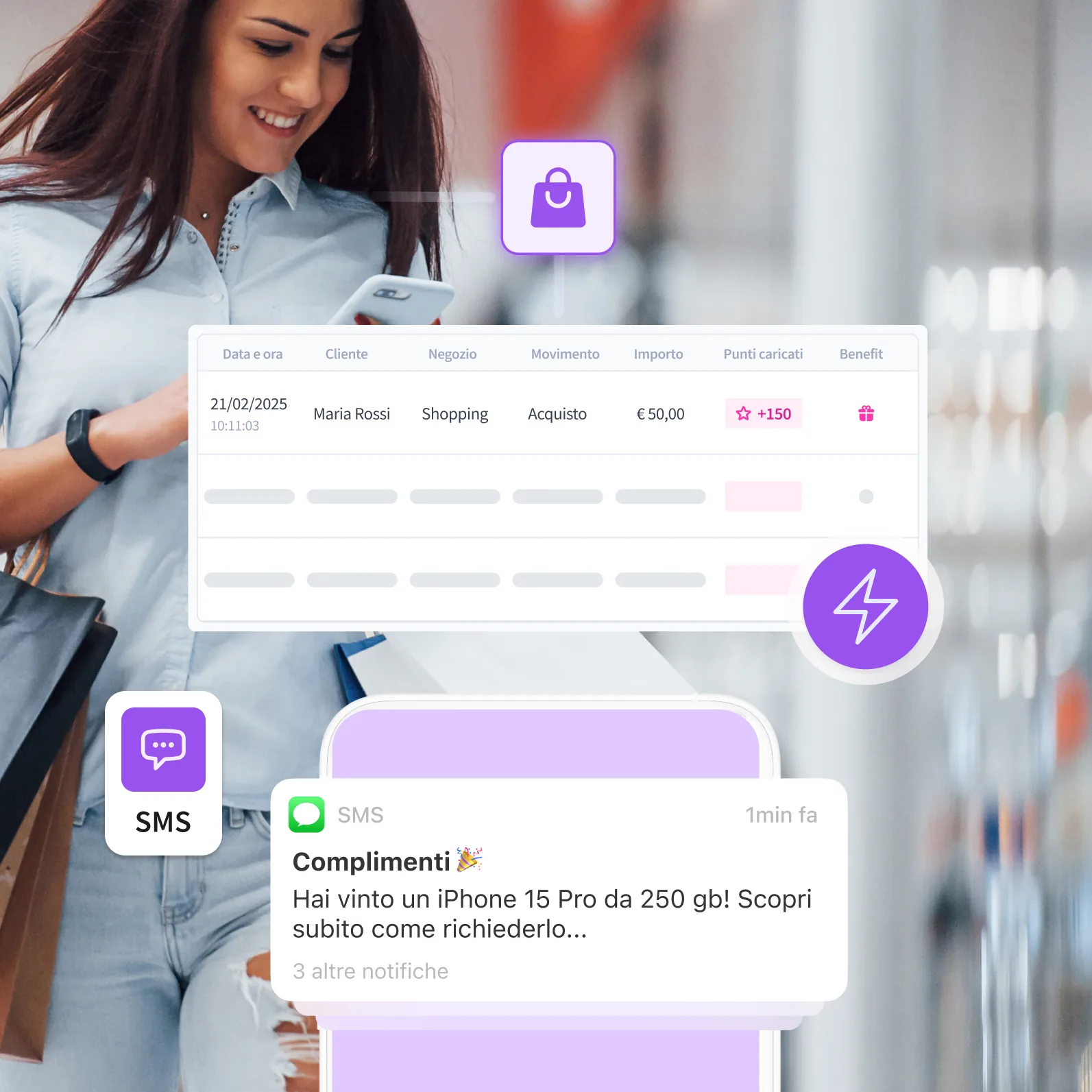
History of a movement, and the points-confirmation SMS sent to the customer.
Automation · Promo engine

Automatic messages in the workflow: the Communicate node sends at the right moment, with no manual step

The Marta Platform promo engine includes a Communicate node you can place in any workflow. When a customer wins a promotion, moves up a tier, receives a coupon or redeems a reward, the node sends a message on the configured channel — email, SMS, push or WhatsApp.

The message uses a template with dynamic tags filled in automatically from the transaction data. No manual step, no delay. Communication becomes part of the promotion flow.

Explore the promotion engine

5 channels, one tool:
reach them at the right moment

Email & SMS

SMTP configured per program, SMS via KPM or RDCom. Templates with dynamic tags you can customise, and presets ready to use.

CORE CHANNELS

Push & WhatsApp

Push via OneSignal, with history in Area Cliente. WhatsApp through the Meta Business API. RCS for rich messages with advanced interaction.

ADVANCED CHANNELS

Dynamic tags

Automatic replacements in every message: #Nome#, #SaldoPunti#, #Tier#, #Email#, plus coupon, gift card and reward data.

PERSONALISATION

Automatic

Communicate node in the promo engine: it sends automatic messages as part of the workflow, with no manual step.

WORKFLOW
All features

Communications: every customer, every channel, every moment

5 channels: email (SMTP), SMS (KPM/RDCom), push (OneSignal), WhatsApp (Meta Business API) and RCS.
Dynamic tags in the text: #Nome#, #SaldoPunti#, #Tier#, #Email#, plus coupon, gift card and reward data.
Reusable templates with ready-made presets: coupon gift, Gift Card gift, tier upgrade, standard notifications.
Audience segmentation: a campaign to a dynamic segment, or to the program's entire customer base.
Communicate node in the promo engine: automatic sending inside the workflow, with no manual step.
Providers you configure per program: each program has its own SMTP, SMS account, OneSignal key and Meta token.
Push test from the back office: check that the notification arrives before you launch the campaign.
Push message history in Area Cliente: unread count and an archive of every notification received.

Frequently asked questions about multichannel communications

Channels, personalisation, automatic sends and providers: what you need to know about Marta's Communications module.

Which communication channels does Marta Platform support?

Marta sends messages on five channels: email, SMS, push notifications, WhatsApp and RCS.

Email leaves from the SMTP server configured for the programme, SMS through the KPM or RDCom providers, push through OneSignal, WhatsApp through Meta's Business platform. RCS brings rich content such as images and buttons into phone messages. All channels are managed from the same back office, with the same templates and the same customer segments.

How do I personalise messages for each customer?

With dynamic tags, placeholders that Marta replaces at send time with that customer's data.

Writing, for example, “Hi #Nome#, you have #SaldoPunti# points and you are a #Tier# customer”, every recipient receives a message with their own name, balance and level. Messages are saved as reusable templates, with a preview, and Marta already includes ready-made models for the most common cases, such as giving a voucher or a gift card.

Can I send communications automatically?

Yes. Besides a manual send from the back office, every promotion can send messages as a workflow action.

That allows messages that start on their own at the right moment: birthday wishes with a points bonus, a confirmation when the customer moves up a level, a reminder to someone who has not bought for 45 days. The message is tied to the event that generates it, so it arrives when it is actually relevant. See how on the Promotions page.

How do I choose who receives a campaign?

You can send to a dynamic audience or to a list of selected customers.

Using an audience is the more effective choice, because the segment updates itself: a campaign to “Gold customers who have not bought for two months” reaches exactly the people who match the criterion at that moment. The same segment can be used on several channels, for example email for everyone and WhatsApp only for people who gave consent.

Can I use my own email and SMS providers?

Yes. Providers are configured per programme: SMTP for email, KPM or RDCom for SMS, Meta for WhatsApp and OneSignal for push.

Each programme can have its own senders and credentials, so different brands on the same platform keep separate identities. From the back office you can check the connection to each provider and send a test push before launching the campaign.

Where does the customer find the messages?

Besides receiving them on the chosen channel, the customer finds push notifications in the Messages section of Area Cliente, with a count of the ones not yet read.

This keeps an important communication from being lost if the notification is ignored in the moment: the customer can come back to it when they open the programme app or site, next to balance, promotions and news.

What is the difference between WhatsApp communications and the WhatsApp Bot?

WhatsApp communications are outbound messages, which the brand sends to the customer; the WhatsApp Bot replies to inbound messages, when the customer writes first.

With the Communications module you send a WhatsApp template to a segment, or start it from a promotion. With the WhatsApp Bot the programme number becomes a desk that is always open: the customer asks for the balance, looks for a store or types a keyword to play. The two tools use the same Meta connection and complete each other.

Which channel should I use for each kind of message?

It depends on how urgent the message is, on the content and on the customer's habits: that is why it helps to have every channel on the same platform.

In general, push and WhatsApp work well for timely notices such as a win or an offer about to expire, email for richer content such as newsletters and catalogues, and SMS for short messages that must arrive even without an app or a data connection. With Marta you can try different channels on the same segment and compare the results, instead of relying on a single channel for everything.

Send the right message, on the right channel, at the right moment

Request a demo and see how Marta Platform multichannel communications work with promotions and audiences for targeted, automatic campaigns.